Selecting the TWAIN Source
|
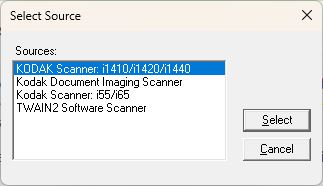
A TWAIN Source must be selected to acquire an image. The Source is analogous to the actual device that will ultimately acquire the image. A TWAIN Source is denoted by the DTWAIN_SOURCE data type. The Source can be selected either by the user using the TWAIN Select Source dialog box, (sample below):
or programmatically without showing the above dialog box. To select and open a Source, the following functions can be used:
The following functions can be used to select a Source, and optionally open the Source if the source is selected. Please note that selecting a Source and opening the selected Source are two separate operations: DTWAIN_SelectDefaultSourceWithOpen DTWAIN_SelectSourceByNameWithOpen All of the above functions that show the TWAIN "Select Source" dialog will show the TWAIN dialog defined by the TWAIN Data Source Manager. In other words, DTWAIN has no control over how or where this dialog is displayed, whether the names in the list are sorted, the title on the dialog box, etc. For this reason, DTWAIN has created a similar dialog, but has many more available options. The following function allows a TWAIN "Select Source" dialog to be displayed with various display options such as positioning of the dialog on the screen, source names appear sorted, etc. |